I was planning to write about my local development setup at my leisure. Moving this forward as my post on LinkedIn the other day about cancelling my Claude Max $100 plan and going local raised a lot more interest and questions than I expected. This post attempts to answer the question: What hardware do you run, what software do you use (inference server and coding agent), and which models do you use?. I have put links to blog posts that may answer some of the other questions in the Further Reading section.
My setup works for me, I am running this on a refurbished MacBook Pro M3 Max with 64GB of RAM. note that LLMs have gotten more performant per unit of hardware and per watt by orders of magnitude over the last couple of years, and there is no end in sight yet. Over the last month my local models have gotten about 2x as fast, while the same or better capability uses less RAM. I can keep a browser open now while running a coding agent ;-). Both models explained below I can just keep running as I go about my day (one model at a time).
TLDR: I run models with llama.cpp. I have a script that pulls and builds the latest llamacpp, because I want to try the latest open weights and open source models. Also the last couple of weeks are seeing almost daily performance improvements, and I like fast feedback. As a coding agent I use Pi.dev, and for chat, questions, brainstorming about writing I use GPTEL in Emacs.
You may note the absence of an IDE in the above. I was an early adopter of eXtreme Programming. If I can write tests first, run them fast, and refactor, I am happy. I rarely need a debugger. I still have a Jetbrains Ultimate subscription, but that is more for technical coaching work than day to day work. LLMs allow me to do refactorings and make refactoring tools on the fly for languages like Elixir that are generally not supported by IDEs anyway.
Assumptions
- We are all figuring this out.
- Quality of a harness (coding agent + "skills" + extensions) can matter as least as much as the model
- Running open models and an open coding agent + custom extensions takes time, but pays off in understanding and a stable base where engineering effort compounds
- Open, local, models have (for me) crossed the point where they are good enough for daily work with a coding agent.
As Patrick Debois noted, mine is a power users' setup. There are other ways to achieve similar goals. Some interesting ones are in the comments on the LinkedIn post, and a surprising one in the Afterword below.
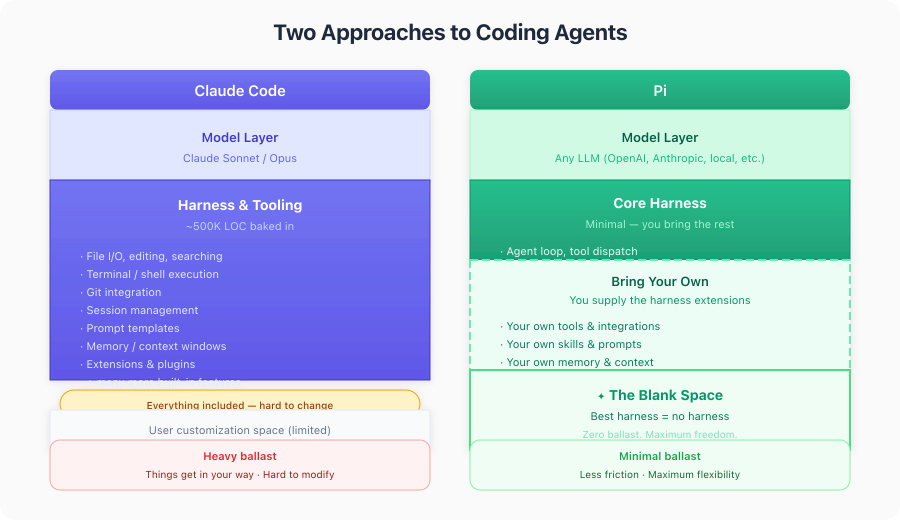
In general it comes down to: more out of the box experience with something like Claude Code, Codex or OpenCode versus more control, personalisation, digital autonomy and data privacy with more of your own harness and local LLMs or hosted ones with strong privacy guarantees.
I made the table below in conversation with the 27B model mentioned below.
Inference: LLamaCPP
I got started with ollama and it looks like Unsloth Studio is promising (but has no Mac hardware acceleration yet as far as I know. it is coming). I run llama.cpp because it is quite fast, and more importantly, stable on MacOs. Model makers often support llamacpp in getting changes in to get their models out - the way inference works is still evolving, quite rapidly. It doesn't matter as much for use in chat, but coding agents use 'tool calls' (xml or json the model emits to request e.g. an ls invocation in bash, or an 'edit' with parameters in JSON), and that is not easy to make reliable.
I try mlx - mac native inference, occasionally, because sometimes it is faster than llamacpp. Often works for chat, but less so for agentic coding.
I have used claude code to get me set up in the past. The llama.cpp has good instructions on how to install and download models. If you want to ground yourself that is probably a better way to start than a prompt.
I have cloned the llama.cpp repository, inside my llama-server-scripts directory. Also a git repository. I have just put llama.cpp in .gitignore. I then had claude make a script to pull and build llama.cpp. This generally works :-). I normally install releases from everything, but I find it hard to wait when promising new models or performance optimisations come out.
I have skipped the instructions for how to install a compiler etc, This Field report: coding with Qwen 3.6 35B-A3B on an M2 Macbook Pro with 32GB RAM also has instructions on how to set up xcode-build etc. As well as some tasks the 35B didnt do so well initially.
➜  llama-server-scripts git:(main) ✗ cat build_llama.sh
#!/usr/bin/env bash
set -euo pipefail

LLAMA_DIR="llama.cpp"

if [ ! -d "$LLAMA_DIR" ]; then
  echo "Error: $LLAMA_DIR directory not found. Clone it first." >&2
  exit 1
fi

cd "$LLAMA_DIR"

echo "Pulling latest llama.cpp..."
git pull

echo "Configuring CMake build..."
cmake -B build \
  -DCMAKE_BUILD_TYPE=Release \
  -DGGML_METAL_EMBED_LIBRARY=ON

echo "Building..."
cmake --build build --config Release -j"$(sysctl -n hw.ncpu)"

echo ""
echo "Build complete."
./build/bin/llama-server --version
Models : Qwen3.6 , 35B-A3B and 27B
These came out in the last two weeks. I ran the 3.5 models before, and they were good enough to tinker with over the easter holiday. 35B is a Mixture of Experts (MoE) model. While these cost more memory, they run much faster on a Mac, or on a machine like my Framework laptop where the whole model does not fit in the GPU - for each token only 3B parameters are active, against 27B parameters for the 'dense' model. The dense model can be more cohesive. In 3.5 the difference was notable in planning and summarisation, 27B is more detailed. But here too, "good enough" counts - the 35B model is often good enough for what I do, and runs much faster. Between 30 and 80 tokens per second as far as I can tell, 27B peaks out at 19 tokens per second at the moment. This makes a big difference when I'm having a chat, less so when I run it in the background while doing something else.
Unsloth has good documentation and set up scripts for both models qwen3.6 at unsloth. The parameters in llama.cpp scripts may look intimidating at first, but I got used to it by starting somewhere and modifying as I saw things come in on https::/reddit/r/LocalLlama.
Note that you don't need a script to start, there is a 'router' script that will start llamacpp, and then via the web UI (which is quite nice now), you can choose which model(s) to load. Often good enough.
Once you have downloaded a model, go to port 8000 and you cna play with it. I quite the chat as it also has conversation forking built in, and shows performance metrics as it runs. This gives me a feel for how a particular model is doing without going into detailed evals.
I will document the 27B model first, as that configuration is the cleanest on my machine. # 27B
I will start with the 27B script, because that is more copy-paste from Unsloth, and then modify to taste. Easier to follow along, hopefully.
Today's special is --spec-default . I couldn't even find documentation for it, so here is a deepwiki query. It sets some default parameters for speculative decoding. This meant that the 27B model now goes over 20 tokens per second sometimes. Not blazing fast, but more comfortable for planning and it can do work in the background and finish inside Pi's timeout limits.
-c 65536 \ sets the context size to 65K tokens. Since I mostly use this model for planning, asking questions etc, I don't need 256K tokens. I am of the 'reset early, reset often' school. Small, focused context for focused results. Contexts have become much less RAM consuming over the last two months, but starting a server.
--chat-template-kwargs '{"preserve_thinking": true}' \ Keeps the reasoning traces. This means that the context in a multi-turn conversation is much easier to cache (all the same tokens come back), and some models perform better when they see reasoning tokens from previous turns (or so I heard). Since inference is relatively slow on a mac, effective caching makes a big difference.
-np 1 - only 1 process at a time. The GPU is already maxed out when a coding agent runs, I can also only single task, and additional processes is additional contexts, and I don't have that much RAM.
--jinja is for templating. The other ones are generating parameters that I probably copied from the unsloth huggingface page.
-hf will download the model from huggingface. unsloth/Qwen3.6-27B-GGUF:Q4_K_M is the name and the quantization of the model. I haven't done an extensive study yet as to which would be the best one for my machine. This roughly matches the default for rapid-mlx, so I have some comparison. Q4 means '4 bits integer'. Values are approximated through a Quantization process. You may lose accuracy, but the Qwen 3.6 models seem to be less sensitive to that. Smaller is generally faster to run, and costs less memory.
The other parameters are mostly general inference parameters, see the model page for options.
run27b.sh:
exec ./llama.cpp/build/bin/llama-server \
    -hf unsloth/Qwen3.6-27B-GGUF:Q4_K_M \
    --spec-default \
    --no-mmproj \
    --fit on \
    -np 1 \
    -c 65536 \
    --cache-ram 4096 -ctxcp 2 \
    --jinja \
    --temp 0.6 \
    --top-p 0.95 \
    --top-k 20 \
    --min-p 0.0 \
    --presence-penalty 0.0 \
    --repeat-penalty 1.0 \
    --reasoning on \
    --chat-template-kwargs '{"preserve_thinking": true}' \
    --host 0.0.0.0 \
    --port 8000
35 B
This has been my daily driver since the second half of last week. I downloaded this by hand. Full model name is probably unsloth/Qwen3.6-35B-A3B-MXFP4_MOE.gguf.
This one was downloaded by hand and follows an older pattern. I used Simon Willisons 'llm' tool to get started. That saves the models in a different place than -hf (which came later).
Here also I am running a smaller quantisation, to see if it works. Apparently not the best, but the last couple of days it has worked for me. Benchmarks came out after I started using it. There is a time for tinkering and a time for making small tools, tinkering will come back at some point.
note that this runs with a much larger context: -c indicates 256 K tokens. This is an area where small open models are following quite closely on the frontier. Cohesion is a different matter, but this model seems quite happy above 100K tokens. Makes improvising more relaxed. Here also --spec-default since yesterday. 35b model last month was running at about 30 tokens per second, now I often see well above 60 with this and other optimizations. It doesn't mean everything, (if you have to run the same prompt 3 times to get a result for instance), but iterating on a prompt is more enjoyable this way.
#!/usr/bin/env bash
set -euo pipefail
ROOT_DIR="$(cd "$(dirname "${BASH_SOURCE[0]}")" && pwd)"
LLAMA_DIR="${ROOT_DIR}/llama.cpp"

MAIN="$HOME/Library/Application Support/io.datasette.llm/gguf/models/Qwen3.6-35B-A3B-MXFP4_MOE.gguf"
ls "${MAIN}"

exec "${LLAMA_DIR}/build/bin/llama-server" \
  -m "$MAIN" \
  --spec-default \
  -c 262144 \
  --temp 0.6 --top-k 20 --top-p 0.95 --repeat-penalty 1.0 \
  --presence-penalty 0.0 \
  --chat-template-kwargs '{"preserve_thinking": true}' \
  --parallel 1 \
  --jinja \
  --host 0.0.0.0 --port 8000
Sandbox: Nono
Never run a coding agent outside a sandbox. That goes for claude code, that has some blocks, but is open to interpretation, and even more for Pi (see below), that runs in You Only Live Once Mode by design. Unless you want your home directory to be deleted for instance.
I use Nono on my mac instead of Docker or devcontainers (also Docker). On Mac Docker needs to run in a VM, that costs me about 9GB of RAM that I needed for LLMs. I also can reuse installed packages over projects, and since I do many experiments, that makes it more fluid.
The sandbox has access to a number of directories on the host, and the current working directory. Nono prompts for permission, you can override that with the --allow-cwd flag.
Invocation:
nono run --profile pi -- pi
Configuration in $HOME/.config/nono/profiles/pi.json
{
  "meta": {
    "name": "pi",
    "version": "1.0.0",
    "description": "Auto-generated profile for pi"
  },
  "filesystem": {
    "allow": [
      "$HOME/Library/caches/elixir_make",
        "$HOME/.hex",
        "$HOME/.local/share/mise/",
        "$HOME/.local/state/mise/",
        "$HOME/Library/Caches/mise/",
        "$HOME/Library/Caches/deno",
        "$HOME/.pi/agent/",
        "$HOME/dev/spikes/llm/monotonic-pi-extensions/packages/",
        "$HOME/Users/willem/.config/git/"
    ],
    "read": [
    ],
    "read_file": [
        "$HOME/.gitconfig"
    ],
    "write": []
  },
  "network": {
    "block": false
  },
  "workdir": {
    "access": "readwrite"
  }
}
Coding agent: Pi.dev
I covered the general setup with a hosted model in how to get started with the pi coding agent on a vps the other day. Pi will point you to the installation documentation as soon as you start it.
Configuration in ~/.pi/agent/models.json:
 {
     "providers": {
         "llama.cpp": {
           "baseUrl": "http://127.0.0.1:8000/v1",
             "api": "openai-completions",
             "apiKey": "dummy",
             "models": [
                 {
                     "id": "Qwen3.6-35B-A3B-MXFP4_MOE.gguf",
                     "name": "Qwen3.6-35B",
                     "reasoning": true,
                     "input": ["text"],
                      "compat": {
                        "thinkingFormat": "qwen-chat-template"
                       },
                     "contextWindow": 262144,
                       "maxTokens": 32768,

                     "cost": { "input": 0, "output": 0, "cacheRead": 0, "cacheWrite": 0 }
                 },
                 {
                     "id": "unsloth/Qwen3.6-27B-GGUF:Q4_K_M",
                     "name": "Qwen3.6-27B",
                     "reasoning": true,
                     "input": ["text"],
                      "compat": {
                        "thinkingFormat": "qwen-chat-template"
                       },
                     "contextWindow": 262144,
                       "maxTokens": 32768,

                     "cost": { "input": 0, "output": 0, "cacheRead": 0, "cacheWrite": 0 }
                 }]
         }
   }
}
This is an excerpt. Notice that the contextWindow for 27B does not match the setting in the run script. There is duplciation here. The OpenAI API that I use here does not export the context window as far as I have found. So you specify this twice, which is annoyting. It would be nice to be able to specify this per request, as not every request needs a massive context. Suggestions welcome!
Further reading
-
Coding agent generates its' own extensions — Engineer solutions in the moment for the agent you're in a session with.
-
A pair pomodoro with Pi — A brief experiment in working in short cycles with a coding agent.
-
How to get started with the Pi coding agent (on a VPS) — Setting up Pi on a VPS is easier than I thought.
-
Smaller open LLMs now work for open agents — A phase shift in quality and speed of open weight models and inference.
-
Nate B Jones had a good podcast / video this week on Apples' play with local models for e.g. legal offices who can not get their work certified if their data leaves the office, no matter how encrypted it is. Nate B Jones on Apple and the next trillion dollars0
Full disclosure: I am long APPL, NVDA and BABA (AliBaba, makers of QWEN). I use other hardware and models too and don't have much Nvidia hardware.
This Field report: coding with Qwen 3.6 35B-A3B on an M2 Macbook Pro with 32GB RAM I have mentioned before has detailed instructions, as well as some development tasks explained in detail.
Afterword
What was remarkable to me in the Field Report above is that the writer chose OpenCode and Qwen3.6 35B over Claude:
Why don't I just use [..] Claude Code? I had problems due to a lack of optimization for small context windows. Long-running tasks that complete large projects independently matter for me, so no Claude Code.
So maybe my intuition is right. I am not doing long running tasks like I was doing with Cladue Code yet with Pi and Qwen. This shows it is possible, and might even be better. Detailed prompts and deterministic harnesses make the difference between frontier models and harnesses smaller. More about that maybe later. I hope this helps you, let me know if you have any questions or remarks.
Acknowledgements
Thanks to Barney Dellar for reporting that the links to my blog in Further Reading were broken. That was the only part I used AI for in this post...