I’m now making a habit of talking to my notes. This helps me get ideas on to the page better and faster, all in the privacy of my own laptop, with local speech recognition and a local Large Language Model to extract key points and todos.
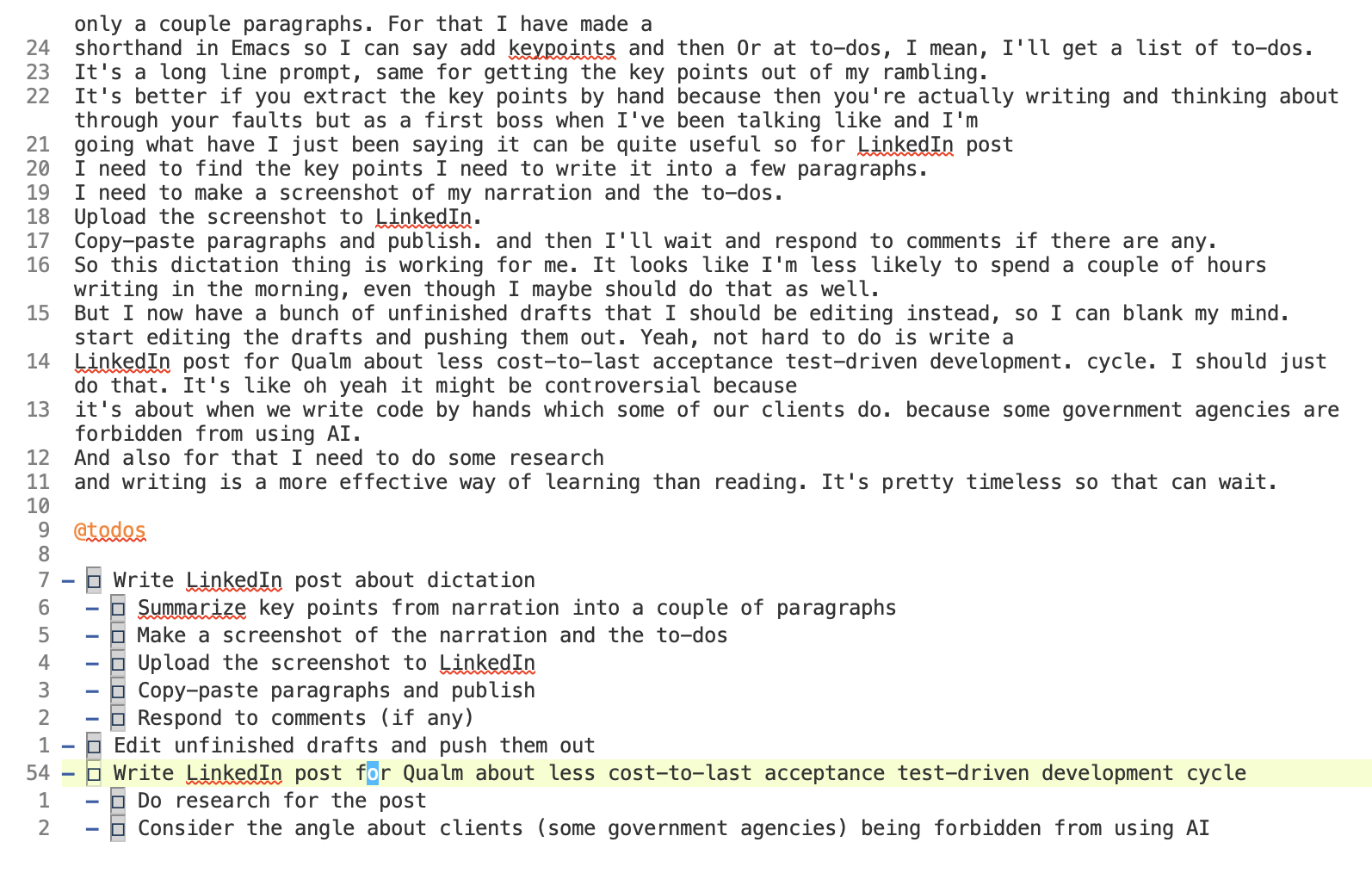
The screenshot below shows the `@todos` command and what QWEN 3.8 27B made of my ramblings.
I use this after my morning walk to plan the day, and in general to draft blog posts, prepare meetings etc.
Local speech to text
Speech To Text running locally is good enough. It makes some mistakes (see how QWAN is spelled as ’Qualm’ for instance), but maybe I need to learn how to articulate better 😀 . The QWEN 27B model is quite detailed in how many todos it extracts, the 35B model a bit more superficial, but both useful. I can always remove or split todos as desired, I have a starting point, quickly. In 2023 local speech to text (OpenAI Whisper) was what made me pay attention to AI again - it was clear that something was happening, and some of it was immediately useful.
Malleable environments
Having environments that you can extend with code (like Emacs, which I use for my personal wiki and publishing blogs), with augmented development, makes a difference quickly. Half an hour of making wishes and you have some progress.
Todo and key points extraction was minutes, because I already had other commands lying around that I could modify by hand - it is only a name and a line of text.
Productive procrastination
In the beginning these things look like displacement activities. But at some point things come together, and actually make your life easier.
What have you done to make your life easier with AI?
Feel free to leave a comment on the LinkedIn post (opens in a new tab) that preceded this blog post.
Afterword, some of the mechanics
I use GPTEL (opens in a new tab) to run local language models to work with my notes, and sometimes to work with code inside a blog post or a slide, when I am preparing an exercise. The `@todos` and `@keypoints` commands I can write in my notes are called presets in GPTELs domain language. I had some more elaborate ones lying around, that also specify a particular model. But I found out, by deleting that and running it, that it is not necessary. So two parentheses, a name and the system prompt to use are enough:
(gptel-make-preset 'todos :system
                   "Extract a list of todos from the text above, in org-mode todo style")

(gptel-make-preset 'keypoints :system
                   "Extract the key points from the text above, for an audience of: ")
Some language models make a distinction between the ’system’ prompt and the ’user’ prompt. In the end it is all a long stream of text that goes through the model.